Manga line art
Enlarge panels for layouts or closer viewing. Inspect hair strands, facial features, and thin outlines for smoothing or added detail.
Enlarge manga panels, comic scans, and anime images with 2K, 4K, or 8K output options. Upload JPG, PNG, or WebP files and compare the results.
After colorizing, upscale your manga panelJPG, PNG, or WebP images, 25 MB each.
Output resolution
Pick the target resolution: 2K, 4K, or 8K
Compare one image or review every result in a batch.
Choose a larger output resolution for manga panels, comic scans, and anime stills. Compare thin outlines, small lettering, and screentones against your source: AI enhancement can change fine textures, and a larger image does not guarantee recovery of missing detail.
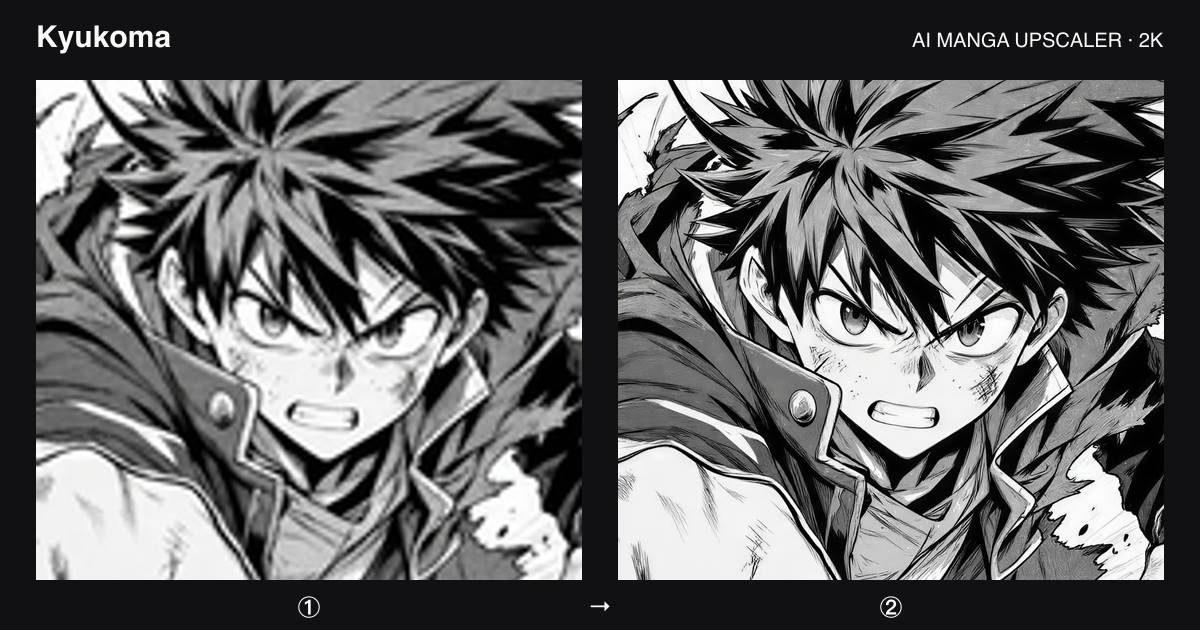
Enlarge panels for layouts or closer viewing. Inspect hair strands, facial features, and thin outlines for smoothing or added detail.
Try a clearer source scan before upscaling heavily compressed images. Check dot patterns and shading for texture changes in the result.
Enlarge still images or panels after colorizing. This tool processes images; use the anime video upscaler for video footage.
Sign in and choose JPG, PNG, or WebP files, up to 25 MB each. Start with one representative panel to evaluate the result.
Select an output resolution and check the credit total. 2K is available on the free plan; 4K, 8K, and batch processing require a paid plan.
Compare a single result with the input or review each image in a batch. Download the output in the same format as its source.
No. 2K, 4K, and 8K are target output resolution tiers, while 4× is a multiplier applied to the input dimensions. The enlargement needed depends on the source image's size. Choose the resolution appropriate for your intended use.
It can generate a larger image, but cannot guarantee restoration of the original detail. Blur, compression, and missing lines limit the source information. Inspect screentones and lettering, and use a higher-quality scan when available.
Upload JPG, PNG, or WebP images up to 25 MB each. Each output keeps its input format. The free plan also has a 5 MB output limit.
Each image costs 1 credit at 2K, 2 credits at 4K, or 4 credits at 8K. You need an account and sufficient credits. The tool shows the total before processing; paid plans unlock 4K and 8K.
Paid plans support batches of up to 20 images. The credit total depends on the number of images and chosen resolution. Review results individually before using them in a finished page.
If you plan to replace dialogue, remove the old text and inspect the cleanup first. If you want color, colorize the panel before the final upscale. Keep original files at each step so you can compare the results.