Adult manga colorization
NSFW & Hentai Manga Colorizer
An online AI colorizer for NSFW manga, hentai and adult doujinshi. Upload a black-and-white panel or full page, describe your colors, then preview and download your colorized artwork.
Explore the general manga colorizerUpload image
JPG, PNG, or WebP.
Color notes
Optional guidance for palette, mood, or lighting.
Choose a colorizer for adult artwork. Compatible models also support a reference image. Each option shows its credit cost.
Preview
View your colorized outputs.
Your colorized images will appear here.
Adult manga colorization
AI NSFW manga colorization, from sketch to color
Mature artwork needs a model that can work with it. If a general-purpose colorizer rejects your drawing, Kyukoma gives you NSFW-capable models in the same workspace. Bring in an original adult comic, a doujin page or a manga panel and build a color pass around your artistic choices.
Keep the focus on your artwork: decide on the character colors, the atmosphere and the light. Use short color notes to guide the image, then inspect the preview and download a result you can continue refining.
Colorize adult manga, hentai and doujinshi
Choose a workflow that fits your artwork, from a single illustration to a complete comic chapter.
NSFW manga colorizer for panels and pages
Upload a black-and-white adult manga panel or a full page as JPG, PNG or WebP. For a page with several panels, describe the overall palette and lighting, then check each panel in the full-size preview.
Hentai colorizer with your own art direction
Give an adult illustration a color treatment that fits the scene. Specify hair, skin tones, clothing and background colors in your notes, and add a reference image on compatible models to guide the look.
Doujin and doujinshi colorizer for chapters
Start with one page of your adult doujinshi to establish the palette. Reuse the same character notes across later pages, process up to 10 images per batch on a paid plan, and review the results together before downloading.
Take the lead on palette, mood and lighting
Models for mature artwork
Explore the available models to find the look that suits your page. Compare their results and credit costs as you develop the color treatment for your project.
Give each character a color direction
Describe hair, eyes, skin tones, clothing and background colors in your notes. Add an optional reference image with a compatible model to give the colorizer a visual guide.
Move from one panel to a sequence
Paid plans let you work on up to 10 images at a time. Reuse your color notes across related pages and download successful results together to keep the chapter moving.
Review the details that matter
Open the full-size preview to check faces, lettering, line work and backgrounds. Download individual results when you are ready to make the final edits in your usual workflow.
Try a clear direction such as “copper hair, navy coat, peach evening light, soft violet shadows.” Repeating the same notes and reference image across a sequence helps guide its color treatment. Review the pages together as you refine the look.
Line art and lighting examples
See how grayscale texture and nighttime lighting can translate into color in these general manga examples. Use them as starting points for your own palette ideas.
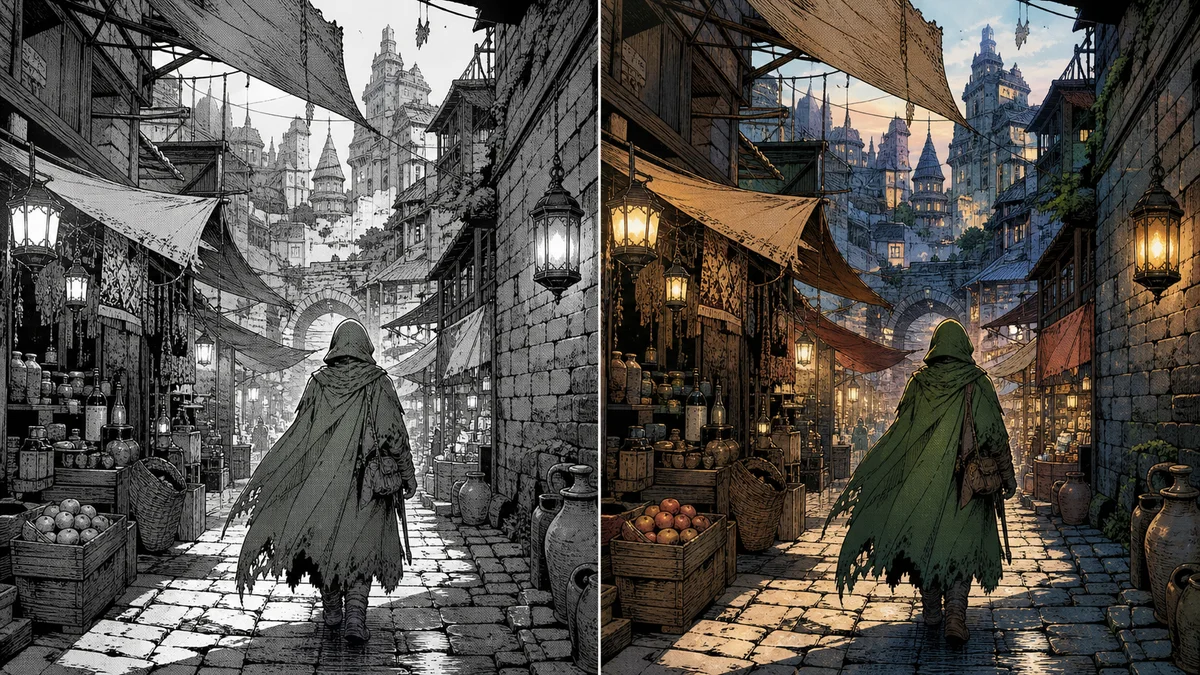
Grayscale scan with preserved line art
Dense screentone and background detail can still receive warm color while keeping the manga scan texture readable.
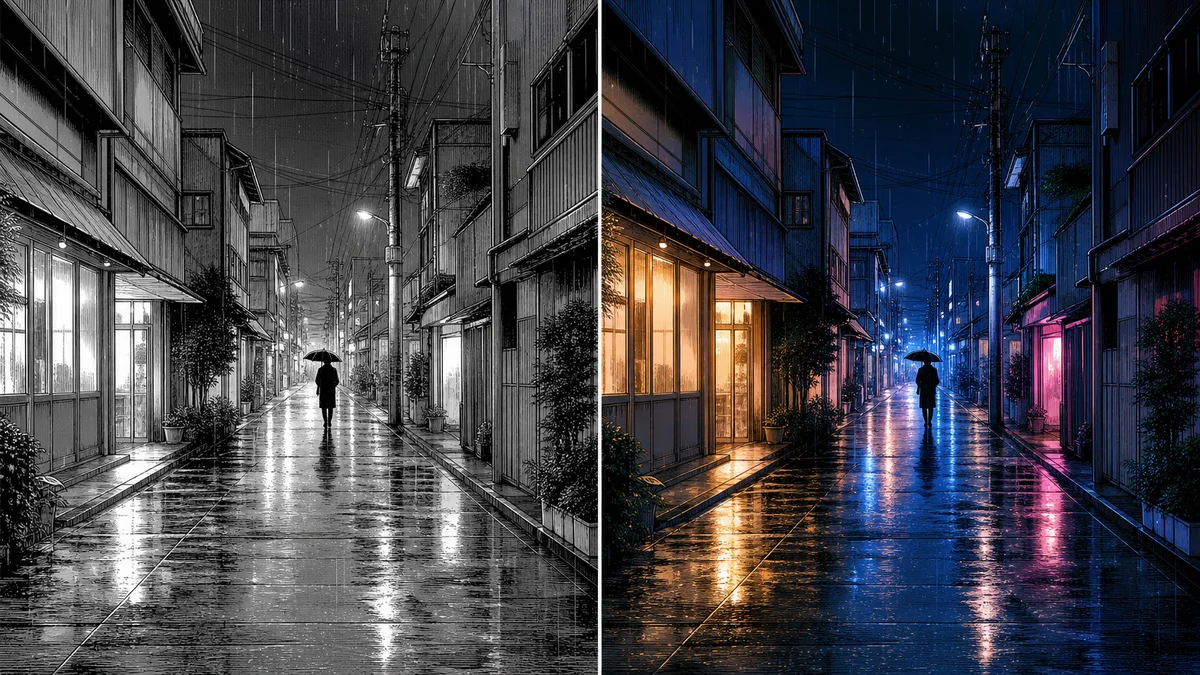
Background-heavy manga scene
Night scenes can use cool shadows, warm windows, and reflected light without losing fine ink details.
How to colorize NSFW manga online
Step 1
Upload your artwork
Choose a JPG, PNG or WebP panel or full page. Use a sharp scan or export so the model can distinguish ink lines and screentones.
Step 2
Describe the palette
Add optional color notes for recurring characters, clothing and lighting. On compatible models, you can also upload a reference image.
Step 3
Choose a compatible model
Select an available model and check its credit cost. Sign in or create an account to start colorization.
Step 4
Preview and download
Inspect the generated image at full size, then download it for further editing. Paid batches also support downloading successful results together.
For adult creators working with fictional art
This page is intended for adults editing illustrations of adult characters. Use your own artwork or material you have permission to edit.
NSFW & hentai colorizer FAQ
Can I use this as a hentai or adult manga colorizer?
Yes. Use this page to add color to existing adult manga, hentai and adult doujin illustrations. Choose an NSFW-capable model, add notes for your palette and lighting, and review the generated result. Compatible models also accept an optional reference image.
Is this an uncensored manga colorizer?
Yes, it’s uncensored.
Can I use this as a doujin or doujinshi colorizer?
Yes. Upload individual panels or full pages from your adult doujinshi as JPG, PNG or WebP images. Doujin and doujinshi refer to self-published work, which is not always adult. For all-ages artwork, you can also use the general manga colorizer.
Does the hentai colorizer generate new manga or color existing art?
It colorizes artwork you upload. Start with an existing manga page, panel or illustration, then use color notes to guide the palette and lighting. You do not need to install drawing software to use the online colorizer.
Which image formats and page layouts work?
Upload JPG, PNG or WebP images, including individual panels and full pages. Clear line art and readable screentones usually work better than blurry or heavily compressed scans.
Can I control colors with a reference image?
Yes, compatible colorizers support an optional reference image. All models accept color notes. References and repeated notes help guide the result, but exact color matching is not guaranteed.
Can I colorize an entire chapter?
Paid plans let you process up to 10 images at a time and download successful results together. For longer chapters, work in batches. Free accounts are limited to one image at a time.
Is NSFW manga colorization free?
A free Kyukoma account includes starter credits. Colorization spends credits at the price shown for the selected model, and batches require a paid plan. Check your balance and the displayed cost before starting.
Will the result preserve every detail and the original resolution?
AI can alter lines, text and fine details, and output dimensions depend on the model. Preview the result before downloading or publishing. Keep your original artwork for comparison and any final corrections.
Give your next page its color direction
Start with a free Kyukoma account and its included starter credits. Upload a page, choose a model and check the displayed credit cost before generating your first color pass.